













































































OnSpace: Tool wey dey use AI, no-code, to create and host your web and mobile apps
Visit Website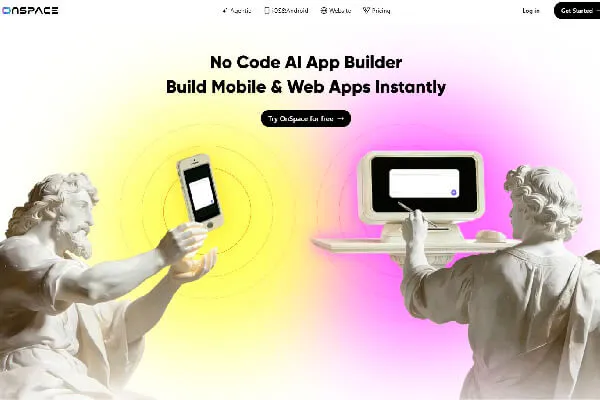
OnSpace, your no-code AI agent to create and monetize your apps
Cheap no-code app creator
OnSpace na AI tool wey allow users create web or mobile app without writing code. You go just describe your app, like say you dey talk to your friend, and OnSpace go handle build am.
Im “Agentic” feature dey help you move even faster. E dey suggest app ideas. When you click one of those ideas, one very well-crafted and precise prompt go load automatically. You fit read the prompt and click the send button make the tool begin work.
I find OnSpace really handy, because e fit host your new app directly, and even integrate monetization system. You fit download the OnSpace app for your phone to create your apps there. Or you fit just log in to im website and work through your browser.
Three years of serious hard work
OnSpace be the company behind the OnSpace.ai platform. William Penrose na cofounder and the public face. The platform start for 2022. At first, e dey only allow low-code development. You fit use am create apps with predefined templates.
Na for July 2025 OnSpace launch im AI project management solution: platform wey no just generate code, but also manage the full deployment infrastructure of the app.
The product as we know am today get update on 30 December 2025. Now e dey allow you create, host, and deploy an app just by writing one prompt.
One unique offer for infrastructure management and monetization
OnSpace dey stand out from competitors because e fit monetize your app immediately after you design am. Unlike other no-code AI tools, the platform no go abandon you with your app; e go help you deploy am and monetize am.
In short, with OnSpace, you no just get web or mobile app. You also get complete infrastructure wey the app fit run on.
From design to monetization: everything wey OnSpace fit do
Your personal geek cofounder
OnSpace fit help you:
- Create a Web app or simple landing page
- Create Android and iOS mobile apps
- Do integration with Supabase for hosting
- Import a Figma design and turn am into an app
Im main feature still be to create a complete app with just one prompt. For OnSpace, dem dey call am “prompt-to-revenue”, meaning from prompt to monetization.
A product wey focus on agentic AI
Wetin make OnSpace special na im ability to understand the context wey your app go operate inside. With “Context Engineering”, the platform fit design apps wey match their development and production environment.
If you dey use OnSpace, e fit feel like say you dey work directly with an expert for AI app development. E dey handle almost all the work wey you need for deployment and running the app.
Pay special attention to im agentic AI tool. Na one ideal innovation to create smart apps: chatbots, image generators, e-commerce assistant, etc. With this feature, you no need do heavy manual configurations to put the app for market.
E no too get finesse for small details
OnSpace fit dey good to understand wetin your app suppose do generally. But for implementing features, the tool dey miss some details or ignore dem completely. For example, I use am create one web app to generate company logos. My prompt talk clearly say the interface suppose fit switch between dark and light mode. OnSpace ignore that request.
Also, I feel say French version for help. Unfortunately, OnSpace na English only!
Tool wey sabi talk with others (Supabase and Github)
OnSpace dey integrate payment processors like Stripe into your app. This way, you fit accept payments from launch. The tool also dey work with Supabase to give your app backend. For real, Supabase dey give you:
- SQL database
- Space to store your files
- Authentication service for your users
OnSpace also allow you sync to GitHub. So you fit export your app there and host am with another provider instead of Supabase.
From my experience, the big flexibility of this tool suppose make am easy to enter any existing workflow. E no dey force plenty integrations or extensions on you; you still dey control your tech stack.
Developers, entrepreneurs and curious people: who OnSpace dey for?
Who suppose get interest first?
OnSpace dey for entrepreneurs wey need mobile or web app for their business.
- You be seller wey wan get your own platform?
- You wan offer online courses for your own site or app?
- You get any digital service wey you wan monetize?
From the moment wey you feel say you go fit dey more effective if you get your own app, then you be the ideal user for OnSpace.
Developers too dey inside. OnSpace dey help dem satisfy more clients in record time.
Fast prototyping and creating simple apps
The best situation to use OnSpace na to quickly create an app to test new business. You don ever get startup idea, then tell yourself “If only I sabi code, I for fit build this startup”? If na so, then you dey the perfect situation to use OnSpace.
For example, I use am launch one business wey allow influencers generate service contracts from text description of the service wey dem go render to company or individual. Within few hours, OnSpace generate the Web app, with option for users to make Stripe payments.
Tool no fit for complex apps wey get plenty features
If you already get an app and you wan improve am, OnSpace no go fit do anything for you. Also, if you need app wey get plenty features, I go advise you avoid this tool. E dey work better when you need build one or two features.
Practical tips to start well with OnSpace
Few minutes to start dey collect money
OnSpace easy to use, because the tool simple. If you fit describe an app, then you fit use OnSpace. Plus, with im agentic AI feature, you fit just describe the main outline of the app, and im models go imagine the details.
As the site talk, you fit get mobile app and start make money within few minutes. Based on my tests, designing and hosting simple app fit truly take just few minutes.
Intuitive and minimalist design
The platform interface simple, with clear menu. In fact, I even think say e no fit be more simple and clean pass this. The main menu bar get only 4 items:
- Agentic: dey open the AI app creation tool
- iOS&Android: dey give access to the mobile app creation tool
- Website: dey carry you go the website creation tool
- Pricing: this page show prices and billing method
No matter your level for using AI tools, you suppose fit use OnSpace from first contact.
Close support on every page
All pages for the site get section for frequently asked questions. You go see answers about how long e go take make your app ready, price details, the technical level you need to use the tool, etc.
If the FAQ no do, open the OnSpace documentation by clicking the "Learn" menu at the bottom of any page for the site. You go find detailed instructions on how to use the tool, best practices, how to write better prompts for the agentic AI, etc.
Also visit im blog to see deeper analysis of topics like good management of mobile app, choosing effective technology to build your website, etc.
Available on all platforms
You fit access OnSpace directly through web browser. If you prefer, you fit download im mobile app on Android or iOS. So you fit create your own app directly on your phone, without writing any code at all.
E pain say the platform dey only available in English. Plus, e no offer any solution for people wey get visual impairment.
Should you pay to use OnSpace AI? My verdict after using the tool
Pricing wey generous well well
You fit use OnSpace free. But e get monthly subscription wey go give you more features and credits. You be company? Contact OnSpace customer service to discuss your needs. You fit then get pricing for one-time purchase.
Breakdown of price plans
OnSpace dey available for these prices:
- 0$/month for 500 credits, one AI agent and access to the code editor.
- 20$/month for 6,000 monthly credits, plus everything for free plan
- 36$/month for 12,000 credits
- 72$/month for 24,000 credits
When you use the free version, your projects dey public and OnSpace logo go show for your apps. With paid version, you keep your projects private, you get access to advanced coding models, and custom domain names for your Web apps. Plus, you fit download the APK of your Android app.
If you pay for one year at once, you go get discount. But there is no money-back guarantee.
The strong point: monetization dey very easy
The way dem take handle the full monetization process of the app na probably the most impressive feature of this tool. I like the stress-free integration of payment methods and the backend support. Everything no perfect, but I no need do everything by myself like with other tools. This advantage alone enough make person recommend OnSpace to entrepreneurs wey no sabi programming.
Agentic AI still need improvement
To win the no-code AI app creation tools market, OnSpace go need improve im agentic AI. E dey understand context and general features of an app well. But e dey make plenty mistakes and hallucinations when implementing those features. When I create one mobile app for currency conversion, I need edit many lines of code manually to get exactly the features wey I ask for. Yet, I clearly talk wetin I dey find.
The ideal app design tool for small entrepreneurs wey no get technical skills
OnSpace dey for people wey wan create simple mobile or web app, host am, deploy am, and monetize am. Based on the tests wey I do with this no-code AI tool, I recommend am first to small entrepreneurs wey no get technical skills wey need simple app to offer their products and collect payment.
The tool no dey work well when you need design app wey get plenty complex features. Developers or startups wey need complex app suppose look for stronger alternatives.