














































































OnSpace: An IA No Code tool for creating and hosting web and mobile applications
Visit Website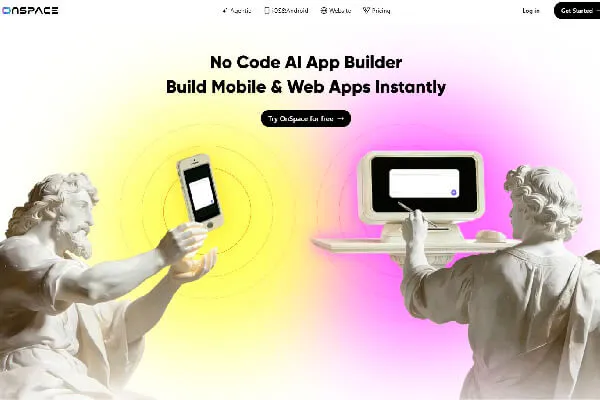
OnSpace, your no code AI agent for app creation and monetization
No-code app creator at low cost
OnSpace is an AI tool that lets users create a web or mobile application without writing code. You simply describe your application, as if you were talking to a friend, and OnSpace takes care of building it.
Its "Agentic" feature lets you go even faster. It suggests ideas for applications. When you click on one of these ideas, an elaborate and precise prompt loads automatically. You can then read the prompt and click on the send button to get the tool working.
I find OnSpace particularly practical, as it can host your new application directly, and even integrate a monetization system. You can download the OnSpace app to your phone to create your applications. Or you can simply connect to its website and work through your browser.
Three years of hard work
OnSpace is the company behind the OnSpace.ai platform. William Penrose is its co-founder and public face. The platform was launched in 2022. Originally, it was only used for low-code development. It could be used to create applications using predefined templates.
In July 2025, OnSpace launched its AI project management solution: a platform that not only generates code, but also manages the entire application deployment infrastructure.
The product as we know it today was updated on December 30, 2025. It now makes it possible to create, host and deploy an application simply by writing a prompt.
A unique infrastructure management and monetization proposition
What sets OnSpace apart from the competition is its ability to monetize your application immediately after it has been designed. Unlike other IA no code tools, the platform doesn't abandon you with your application, it helps you deploy and monetize it.
In short, with OnSpace, you don't just get a web or mobile application. You also get a complete infrastructure on which it can run.
From design to monetization: everything OnSpace can do
Your personal geek co-founder
OnSpace can help you:
- Create a web application or a simple landing page
- Create Android and iOS mobile applications
- Integrate with Supabase for hosting
- Import a Figma design and turn it into an application
Its flagship feature remains the creation of a complete application using a single prompt. At OnSpace, they call this "prompt-to-revenue", i.e. from prompt to monetization.
An agentic AI-oriented product
What makes OnSpace special is its ability to understand the context in which your application will evolve. Thanks to "Context Engineering", the platform can design applications adapted to their development and production environment.
Using OnSpace, you can feel as if you're working directly with an AI application development expert. It takes care of almost all the work involved in deploying and operating an app.
Pay particular attention to its agentic AI tool. This is an ideal innovation for creating intelligent applications: chatbots, image generators, e-commerce assistants and so on. Thanks to this feature, you don't need to perform cumbersome manual configurations to bring the app to market.
Lack of detail
OnSpace may be good at understanding what your application needs to do in general terms. However, in feature implementation, the tool misses certain details or ignores them altogether. For example, I used it to create a web application for generating company logos. My prompt clearly requested that the interface be able to switch between dark and light modes. OnSpace ignored this request.
In addition, I find that a French version would have been useful. Unfortunately, OnSpace is in English only!
A tool that talks to others (Supabase and Github)
OnSpace integrates payment processors such as Stripe into your application. This means you can accept payments right from the start. The tool also works with Supabase to provide a backend for your application. In concrete terms, Supabase offers you
- A SQL database
- Storage space for your files
- An authentication service for your users
OnSpace also lets you synchronize with GitHub. This means you can export your application to GitHub and host it with a provider other than Supabase.
In my experience, the great flexibility of this tool should enable it to fit easily into an existing workflow. It doesn't impose many integrations or extensions on you, so you retain control over your tech stack.
Developers, entrepreneurs and the curious: who is OnSpace for?
Who should be interested first?
OnSpace is for entrepreneurs who need a mobile or web application for their business.
- Are you a vendor looking for your own platform?
- Would you like to offer online courses on your own website or app?
- Do you have a digital service to monetize?
The moment you feel that you could be more efficient if you had your own app, then you're the ideal user for OnSpace.
Developers are also concerned. OnSpace enables them to satisfy a greater number of customers in record time.
Rapid prototyping and simple app creation
The best situation in which to use OnSpace is to quickly create an app to test a new business. Have you ever had an idea for a start-up, then thought "If only I knew how to code, I could get this start-up up and running"? If so, then you're in the perfect situation to use OnSpace.
For example, I used it to launch a business that allows influencers to generate service contracts based on a text description of the service they will provide to a company or individual. In just a few hours, OnSpace generated the web application, with the option for users to make Stripe payments.
An unsuitable tool for complex, feature-rich apps
If you already have an application and want to improve it, OnSpace won't be able to do anything for you. What's more, if you need a feature-rich app, I'd advise you to avoid this tool. It works best when you only need to develop one or two features.
Tips for getting started with OnSpace
Just a few minutes to start getting paid
OnSpace is very easy to get to grips with, because the tool is simple to use. If you can describe an application, then you'll know how to use OnSpace. What's more, with its agentic AI functionality, you can just describe the broad outlines of the app, and its models will take care of imagining the details.
As the site says, you can get a mobile app and start making money in minutes. In my testing, designing and hosting a simple app can really take minutes.
Intuitive, minimalist design
The platform's interface is simple, with an explicit menu. In fact, I don't think it could have been any simpler. The main menu bar has just 4 items:
- Agentic: opens the AI app creation tool
- iOS&Android: Gives access to the mobile app creation tool
- Website: Leads to the website creation tool
- Pricing: This page shows prices and billing methods.
No matter what your level of proficiency with AI tools, you should be able to use OnSpace right out of the box.
Local help on every page
Every page of the site has a section for frequently asked questions. Here you'll find answers to questions such as how long it takes to get your app ready, pricing details, the technical level you need to use the tool, and so on.
If the FAQs aren't enough, open the OnSpace documentation by clicking on the "Learn" menu at the bottom of any page on the site. There you'll find detailed instructions on how to use the tool, best practices, how to better write your prompts for agentic AI, etc.
You can also visit his blog to discover a more in-depth analysis of topics such as how to manage a mobile application, how to choose the right technology for your website, etc.
Available on all platforms
OnSpace can be accessed directly via a web browser. If you prefer, you can download its mobile application on Android or iOS. This way, you can create your own app directly on your phone, without writing any code.
It's a shame that the platform is only available in English. What's more, it doesn't offer any solutions for the visually impaired.
Do I have to pay to use OnSpace AI? My verdict after using the tool
Generous pricing
You can use OnSpace for free. But there's also a monthly subscription that gives you more features and credits. Are you a company? Contact OnSpace customer service to discuss your needs. You may be eligible for one-time purchase pricing.
Focus on pricing formulas
OnSpace is available at the following prices:
- 0/month for 500 credits, an AI agent and access to the code editor.
- 20/month for 6,000 monthly credits, plus everything free of charge
- 36/month for 12,000 credits
- 72/month for 24,000 credits
When you use the free version, your projects are public and the OnSpace logo is displayed on your apps. With the paid version, you keep your projects private, and have access to advanced coding templates, as well as personalized domain names for your Web apps. What's more, you can download the APK of your Android app.
If you pay for a year directly, you'll benefit from a discount. However, there's no money-back guarantee.
The strong point: easy monetization
Taking care of the whole app monetization process is probably the most impressive feature of this tool. I liked the stress-free integration of payment methods and the backend support. Not everything was perfect, but I didn't have to do everything myself, as is the case with other tools. This alone is enough to recommend OnSpace to entrepreneurs who know nothing about computer programming.
Agentic AI in need of improvement
To conquer the market of no-code AI tools for creating applications, OnSpace will have to improve its agentic AI. It understands the context and general functionality of an application. But it makes a lot of mistakes and hallucinations in implementing these functionalities. In creating a mobile currency conversion application, I had to rework many lines of code manually to get exactly the functionality I wanted. Yet I had clearly indicated what I was looking for
The ideal app design tool for small entrepreneurs without technical skills
OnSpace is aimed at people who want to create a simple mobile or web application, host it, deploy it and monetize it. Based on the tests I've carried out with this IA no code tool, I'd recommend it primarily to small entrepreneurs with no technical skills who need a simple application to offer their products and get paid for them.
The tool doesn't work well when you need to design an application with a lot of complex functionality. Developers or startups who need a complex app should look for more powerful alternatives.