















































































Grammarly - The Writing Assistant That Actually Helps
Visit Website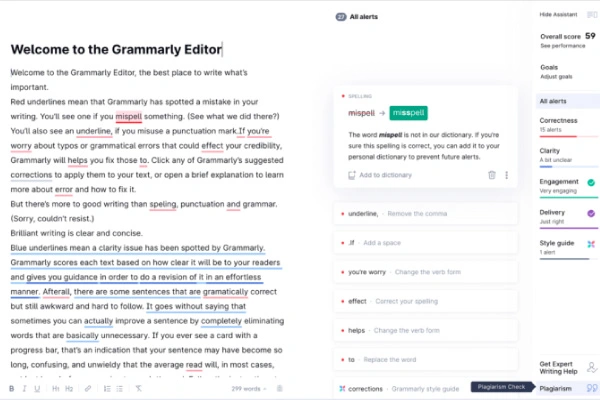
Everyone makes writing mistakes. Typos slip through. Sentences run too long. Commas appear where they shouldn't—or vanish where they should. Grammarly exists to catch these errors before anyone else does. What started as a grammar checker has evolved into a comprehensive AI-powered writing assistant used by millions worldwide.
Whether you're drafting a crucial business email, polishing an academic essay, or just texting with slightly more dignity, Grammarly watches over your shoulder—quietly fixing mistakes and suggesting improvements.
Features Beyond Spell Check
Modern Grammarly does far more than underline misspelled words. Its capabilities have expanded considerably.
- Grammar and punctuation: The foundation. Subject-verb agreement, comma splices, apostrophe misuse—Grammarly catches these reliably.
- Spelling corrections: Contextual spelling matters. "Their," "there," and "they're" get sorted correctly based on usage.
- Clarity improvements: Wordy sentences get trimmed. Passive voice gets flagged. Readability improves with specific suggestions.
- Tone detection: Is your email sounding angry when you meant assertive? Grammarly analyzes tone and warns about potential misinterpretations.
- Plagiarism detection: Premium users can check documents against billions of web pages to ensure originality.
- Vocabulary enhancement: Overusing certain words? Grammarly suggests synonyms to add variety.
- GrammarlyGO: The newest addition—generative AI that can rewrite, compose, and reply based on prompts.
The free version handles basic grammar and spelling. Grammarly Premium adds advanced suggestions, tone analysis, and plagiarism checking. Grammarly Business offers team features and style guides.
Where Grammarly Lives
Integration is Grammarly's secret strength. It works almost everywhere you type.
Browser extensions cover Chrome, Firefox, Safari, and Edge—checking text in Gmail, Google Docs, social media, and countless web forms. Desktop apps for Windows and Mac provide system-wide coverage. Mobile keyboards bring the same assistance to smartphones. There's even a dedicated Microsoft Office plugin.
This ubiquity means consistent writing quality across platforms without switching tools or copying text around.
Who Relies on Grammarly?
Students use it to polish essays and avoid embarrassing errors. Professionals depend on it for client-facing communications. Non-native English speakers gain confidence in their writing. Authors catch typos that would otherwise slip into published work.
Customer support teams maintain consistent quality across thousands of responses. Marketers ensure copy is clean before campaigns launch. Executives review important emails before sending. Academics check papers against plagiarism databases.
Even confident writers benefit. Everyone has blind spots—words habitually misspelled, punctuation rules misremembered. Grammarly serves as a tireless, judgment-free editor.
Limitations to Consider
Grammarly isn't perfect. It occasionally suggests changes that alter intended meaning. Creative writing can feel stifled by its preference for conventional structures. Over-reliance might prevent learning from mistakes.
Privacy-conscious users should note that text gets processed on Grammarly's servers—something to consider for sensitive documents.
The Bottom Line
Few tools deliver such immediate, tangible value. Every email, every document, every message becomes slightly better with minimal effort. Grammarly won't transform mediocre writing into brilliance, but it reliably prevents careless errors from undermining otherwise solid work. That's worth something.